Changelog

Follow new updates and improvements to Notewise.

August 17th, 2026

Meet Notewise 4.0, Your 24/7 thinking partner. It brings together every way you think in one place, so ideas connect, decisions flow and nothing you save gets lost.

Write Your First AI Note

  • Capture Anything: Start where the thought lives. Begin a note with audio, text, files, handwriting or even images, then add any other format within the same note.
  • Note: A living note that builds itself from everything you capture, bringing forward the most important details. It auto-updates with every edit.
  • Custom Tabs: View the same note in 20+ formats, from action items to Cornell notes, or create your own.
  • In-Note Chat: Ask anything about the note you’re in, across its recordings, canvas, text, images and files.
  • Global Chat: Chat across every note and the web from one place, with the context of your work already there.

Your Canvas, Shaped by Your Feedback

  • Redesigned Toolbar: Customize your toolbar. Keep the tools you use, hide the ones you don’t and reach more colours in Quick Control.
  • Connector: Link any two elements to connect ideas, build diagrams and map workflows.
  • Font Selection: Choose from more than 2,000 Google Fonts to create beautiful notes.

More for Every Plan

  • Free and Unlimited Plan users can now import all supported formats, including docs and slides, and upload videos to the canvas.
  • The Starter Plan now includes AI Chat, Quiz and Magic Select.

More Details

  • We have a new logo. 4.0 brings a fresh look that better reflects where Notewise is headed next.
  • Free and Unlimited Plans have been renamed to Classic Free and Classic Unlimited
  • A few under the hood fixes to improve your Notewise experience.

May 19th, 2026

A new Calligraphy Pen for beautiful handwriting, smarter Sticky Notes & Tables that move with your content, and Page-Level Undo/Redo for every "wait, no" moment.

Notewise iOS

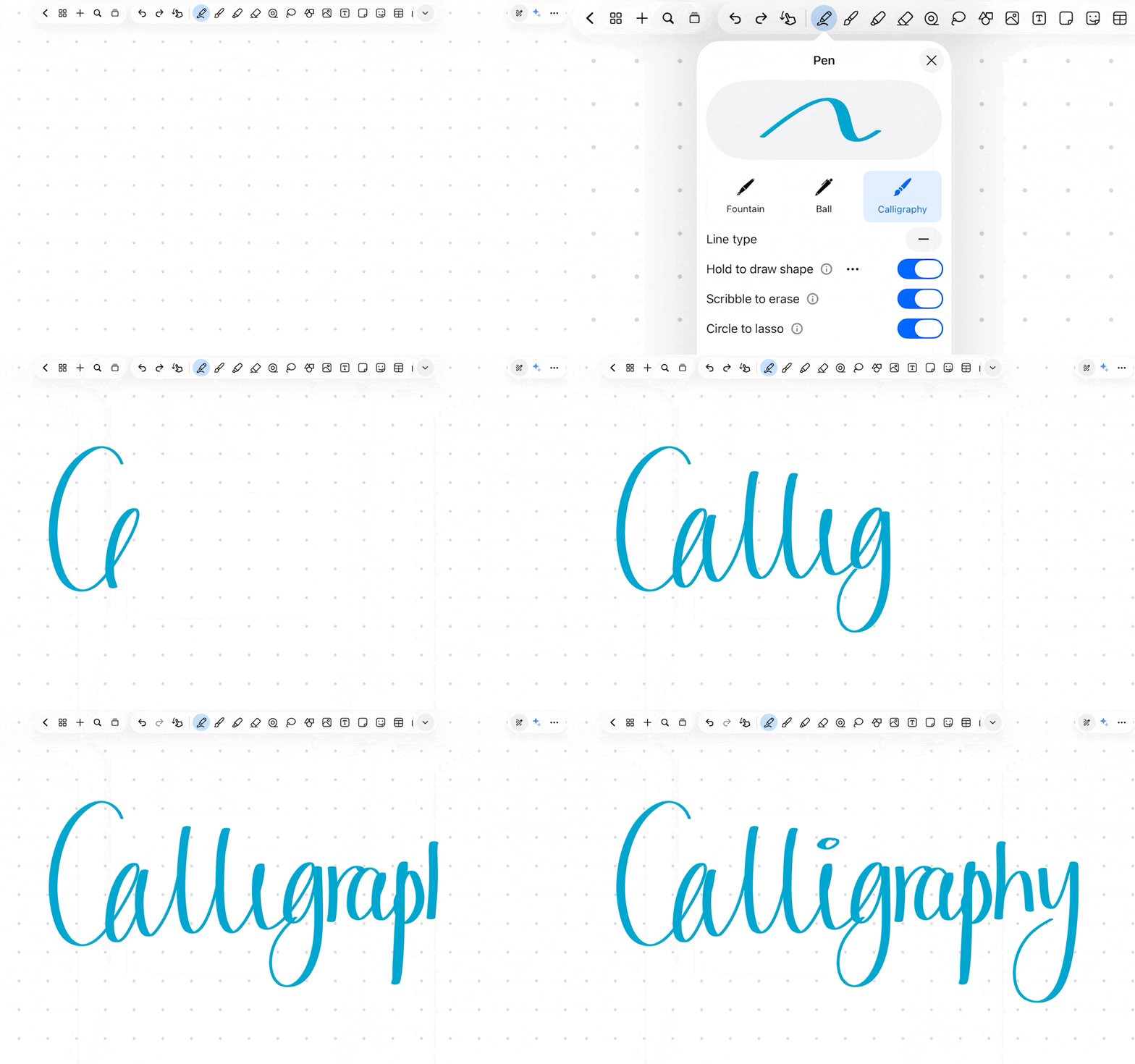
  • Meet Calligraphy Pen. The new upgrade to Notewise's pen collection. Write beautifully, think freely.
  • Sticky Notes and Table got smarter: Add text, drop in images, move everything as one.
  • Page-Level Undo/Redo is here for every rotate, reorder, and "wait, no" moment.
  • And a few quiet fixes. Even the best notepads have a scratch page.

Notewise Android

  • Meet Calligraphy Pen. The new upgrade to Notewise's pen collection. Write beautifully, think freely.
  • Sticky Notes and Table got smarter: Add text, drop in images, move everything as one.
  • Page-Level Undo/Redo is here for every rotate, reorder, and "wait, no" moment.
  • And a few quiet fixes. Even the best notepads have a scratch page.

March 27th, 2026

You can now embed videos directly onto the canvas, use the intuitive circle-to-lasso gesture for selections, and enjoy faster PDF rendering across all your digital notes.

Notewise iOS

  • Introducing videos on canvas, allowing you to bring your notes to life with embedded videos.
  • Introducing circle-to-lasso, where drawing and holding a circle converts it into a lasso for quick selection.
  • Introducing a new arc shape that automatically forms as you draw.
  • Supports adjusting image opacity.
  • Supports importing Notewise files into existing notes.
  • Improves pdf loading & rendering speed.
  • General bug fixes and performance improvements.

Notewise Android

  • Introducing videos on canvas, allowing you to bring your notes to life with embedded videos.
  • Introducing circle-to-lasso, where drawing and holding a circle converts it into a lasso for quick selection.
  • Introducing a new arc shape that automatically forms as you draw.
  • Supports adjusting image opacity.
  • Improved PDF export with vectorized text.
  • Improves pdf loading & rendering speed.
  • General bug fixes and performance improvements.

February 6th, 2026

You can now customize your notes with a new sticker collection, toggle horizontal scrolling per note, utilize a two-page layout, and edit shapes instantly with a long press.

Notewise iOS

  • Stickers are here. Decorate your notes with our full sticker collection.
  • Horizontal scroll support. Set your preferred direction β€” even per note.
  • New two-page layout. Switch between single and two-page views, vertically or horizontally.
  • Seamless shape editing. Hold to draw, then edit shapes instantly.
  • Faster page navigation. Jump pages with a single tap.
  • More audio playback control. Choose whether recordings auto-play next.
  • General bug fixes and performance improvements.

Notewise Android

  • Stickers are here. Decorate your notes with our full sticker collection.
  • Horizontal scroll support. Set your preferred direction β€” even per note.
  • New two-page layout. Switch between single and two-page views, vertically or horizontally.
  • Seamless shape editing. Hold to draw, then edit shapes instantly.
  • Faster page navigation. Jump pages with a single tap.
  • More audio playback control. Choose whether recordings auto-play next.
  • General bug fixes and performance improvements.

December 23rd, 2025

You can now express yourself with creative brushes, explore deeper canvas insights using Magic Select, and enjoy a faster writing experience with an expanded low latency engine.

Notewise iOS

  • Introducing Creative Brushes. Explore pencil, watercolor, and more to unleash your creativity.
  • Meet the new Magic Select. You can now select anywhere on the canvas to get deeper insights.
  • Customize text backgrounds with new options for color, corner radius, and padding.
  • Sticky Notes are now collapsible. Single tap to expand and double tap to start editing.
  • Zoom out to 50% to get a better view of your notes.
  • General bug fixes and performance improvements.

Notewise Android

  • Introducing Creative Brushes. Explore pencil, watercolor, and more to unleash your creativity.
  • Meet the new Magic Select. You can now select anywhere on the canvas to get deeper insights.
  • Customize text backgrounds with new options for color, corner radius, and padding.
  • Sticky Notes are now collapsible. Single tap to expand and double tap to start editing.
  • We’ve improved our low latency engine and it is now available on more devices. Try it out in the low latency settings.
  • General bug fixes and performance improvements.

November 6th, 2025

We’ve added AI-powered handwriting and audio transcription, introduced a new sticky note tool, and implemented customizable corner radii for shapes to give you more creative control.

Notewise iOS

  • Convert handwriting to text using the lasso tool, enhanced with Notewise AI. Gain deeper insights, solve math problems, and explore concepts more effectively
  • Transcribe audio to text and automatically renamed with Notewise AI.
  • Introducing Sticky Note β€” a new tool to help you capture and organize your thoughts effortlessly.
  • Supports corner radius customization for rectangle, triangle, polygon, and star shapes. You can even set different radii for each corner for a unique look.
  • Supports image reordering when importing as a new note.
  • You can now switch between your current tool and the laser pointer with your stylus buttons.
  • General bug fixes and performance improvements.

Notewise Android

  • Convert handwriting to text using the lasso tool, enhanced with Notewise AI. Gain deeper insights, solve math problems, and explore concepts more effectively
  • Transcribe audio to text and automatically renamed with Notewise AI.
  • Introducing Sticky Note β€” a new tool to help you capture and organize your thoughts effortlessly.
  • Supports corner radius customization for rectangle, triangle, polygon, and star shapes. You can even set different radii for each corner for a unique look.
  • Supports image reordering when importing as a new note.
  • You can now switch between your current tool and the laser pointer with your stylus buttons.
  • General bug fixes and performance improvements.

September 21st, 2025

We’ve introduced a Liquid Glass design for iOS, advanced AI tools for chatting with your notes, multilingual text recognition, and a new Zoombox for more precise handwriting.

Notewise iOS

  • Meet the all-new Notewise with Liquid Glass design - now with multi-window, freeform resizing, and menu bar commands.
  • Notewise AI – Chat with your notes, generate audio guides, and ask questions on selected content.
  • AI Text Recognition – Find text in handwriting, scans, and photos across 20+ languages.
  • Zoombox – Zoom into any part of your note for precise writing.
  • Flexible Imports – Place files exactly where you want: new note or existing one.
  • Bug fixes and performance improvements.

Notewise Android

  • Notewise AI – Chat with your notes, generate audio guides, and ask questions on selected content.
  • AI Text Recognition – Find text in handwriting, scans, and photos across 20+ languages.
  • Zoombox – Zoom into any part of your note for precise writing.
  • Enhanced Textbox – Live text edits on the canvas with real-time handwriting-to-text.
  • Flexible Imports – Place files exactly where you want: new note or existing one.
  • Bug fixes and performance improvements.

July 24th, 2025

We’ve introduced a sleek floating toolbar and a new Tape Tool for hiding content, alongside helpful library tags and an improved system for switching between your favorite notes.

Notewise iOS

  • Brand‑new UI with a sleek floating toolbar, adaptive layout, and refreshed menus.
  • Tape Tool: Hide and reveal content with a tap!
  • Reorder tools for faster access.
  • Snappier, more precise rotation controls.
  • Add tags to organise your library your way.
  • Quick‑switch between recent notes β€” pin and reorder your favourites.
  • Bulk export/import with folders.
  • General bug fixes and performance improvements.

Notewise Android

  • Brand‑new UI with a sleek floating toolbar, adaptive layout, and refreshed menus.
  • Tape Tool: Hide and reveal content with a tap!
  • Reorder tools for faster access.
  • Snappier, more precise rotation controls.
  • Add tags to organise your library your way.
  • Zoom out to 50% for a full‑content overview.
  • Quick‑switch between recent notes β€” pin and reorder your favourites.
  • Bulk export/import with folders.
  • General bug fixes and performance improvements.

May 8th, 2025

You can now integrate Apple Intelligence for creative tasks, link notes and websites together, apply rounded borders to images, and snap your drawings precisely to ruler graduations.

Notewise iOS

  • Notewise now supports Apple Intelligence. Unleash your creativity with image playground and writing tools.
  • Introducing links: easily connect to different pages, notes, or websites.
  • Add rounded corners and borders to images for a polished look.
  • Snap to ruler graduations for more precise drawing.
  • General bug fixes and performance improvements.

Notewise Android

  • Introducing links: easily connect to different pages, notes, or websites.
  • Add rounded corners and borders to images for a polished look.
  • Snap to ruler graduations for more precise drawing.
  • General bug fixes and performance improvements.

April 3rd, 2025

You can now create pixel-perfect drawings using snap to align, utilize freeform polygon and flexible curve shapes, and take full control of your workspace with manual ruler angles.

Notewise iOS

  • Snap to align: achieve pixel-perfect drawings with ease.
  • Supports a new freeform polygon shape.
  • Supports more flexibility for curve shape.
  • Supports manual ruler angle control.
  • Supports configuring tabs to close automatically.
  • General bug fixes and performance improvements.

Notewise Android

  • Snap to align: achieve pixel-perfect drawings with ease.
  • Supports a new freeform polygon shape.
  • Supports more flexibility for curve shape.
  • Supports manual ruler angle control.
  • Supports configuring tabs to close automatically.
  • General bug fixes and performance improvements.